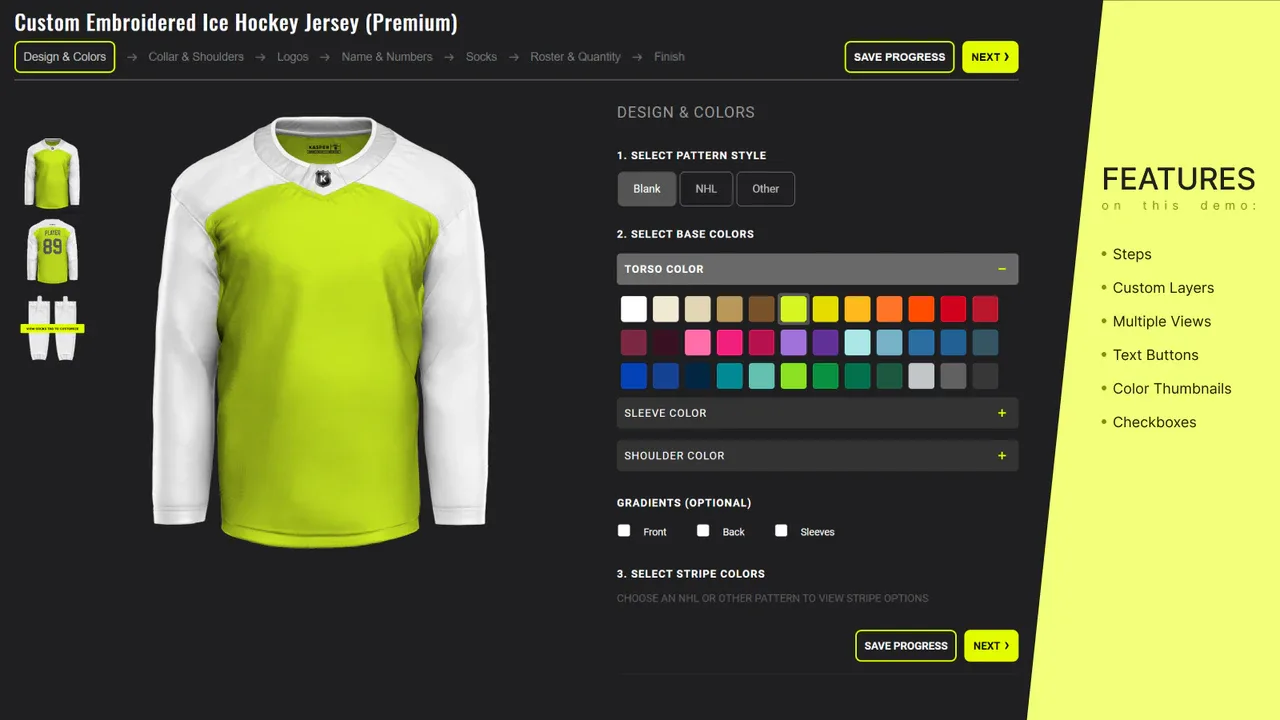
3D product configurators: What they cost, how they work, and who builds them
If you sell a product with options, whether that is a sofa in 14 fabrics, a ring with interchangeable stones, or a machine with modular components, you have probably looked into 3D product configurators. The idea is simple: instead of showing a grid of static photos for every combination, you let the customer change options in real time on an interactive 3D model. They pick a color, the model updates instantly. They rotate it, zoom in, check the stitching.
The business impact is not subtle. Shopify reported a 94% higher conversion rate on product pages with 3D models compared to pages with only flat images (source: Zolak). Home Depot measured up to 200% higher conversions after rolling out 3D visualization (source: 3Devision). On returns, Shopify found a 40% drop for merchants using 3D product views. A DTC furniture company saw a 15% reduction in return rates after adding 3D tools.
These numbers make the case. The harder question is how to actually build one, what it costs, and who you need on the team. This guide covers all three.
How a 3D product configurator works
At its core, a configurator has three parts.
The first is the 3D viewer. This is the component that renders a three-dimensional model of your product in the browser. It handles rotation, zoom, lighting, shadows, and material rendering. Most configurators use Three.js or Babylon.js for this layer. Three.js is the more common choice, with around 5 million npm downloads per week and 111k stars on GitHub.
The second is the configuration logic. When a customer selects "walnut finish" instead of "oak," something needs to swap the texture on the 3D model, update the price, check availability, and maybe adjust the delivery estimate. This logic connects the 3D viewer to your product data and inventory.
The third is the asset pipeline. Every color, material, and component option needs a corresponding 3D asset: textures, materials, and sometimes separate geometry files. A sofa configurator with 14 fabrics and 3 leg styles needs 14 fabric textures and 3 leg models, all optimized for fast loading on mobile. This is the part most teams underestimate.
Real examples worth studying
Several companies have built configurators that are publicly accessible and worth looking at to understand what's possible at different levels of complexity.
IKEA's kitchen planner lets customers design full kitchen layouts, choosing cabinet sizes, materials, countertops, and appliances. The level of customization is deep and the rendering is clean. It is the gold standard for furniture configurators, though it took a massive engineering team to build.
Vitra takes a smarter approach for a smaller catalog. Their chair configurator shows pre-configured versions first and lets you adjust from there, reducing decision fatigue. The user experience feels simple even though there are many possible combinations (source: London Dynamics).
Lundia, a Finnish shelving company, built a configurator where customers choose the number of shelves, height, width, and material. Pricing updates in real time as you adjust. This is a good reference for smaller companies because the scope is manageable but the result is polished.
In automotive, Lucid Motors lets shoppers configure electric vehicles by selecting colors, wheels, and interior options, then view the result from any angle. BMW goes further with augmented reality, letting you place the configured car in your driveway through your phone camera (source: GlamAR).
In jewelry, brands like Jweel let customers design rings by selecting settings, stones, and engravings, with real-time 3D preview showing every detail including light reflections on metal surfaces.
Build vs buy
This is the first decision you need to make, and it depends on how central the configurator is to your business.
SaaS platforms
If you sell a relatively simple product with a few options (colors, sizes, materials) and you use Shopify or WooCommerce, a SaaS configurator platform is probably enough. Tools like Zakeke, Threekit, Expivi, and Vectary offer drag-and-drop configuration builders that connect to your store. You upload your 3D models, define the options, and embed the viewer on your product page.
Pricing ranges from $500 to $5,000 per month depending on features, traffic volume, and number of products (source: Rankify Content). The advantage is speed: you can have a working configurator in weeks rather than months. The disadvantage is limited customization. If you need very specific behavior, unusual product logic, or tight integration with internal systems, you will hit the walls of the platform quickly.
Custom development
If your product has complex configuration rules (hundreds of variants, dependencies between options, modular assemblies) or you need the configurator tightly integrated into a custom ecommerce stack, you need a custom build. This is the route most manufacturing and B2B companies take, and increasingly what direct-to-consumer furniture and automotive brands choose.
Custom development starts at $50,000 for a basic configurator and can run well above $150,000 for complex implementations with advanced rendering, AR features, and enterprise backend integration (source: The Intellify). On top of the development cost, 3D model creation runs $200 to $1,000 per product depending on complexity, and annual maintenance is typically 10 to 15% of the initial build cost.
The upside is that you own the code, you can customize every detail, and you are not paying monthly platform fees that scale with traffic.
Agency vs in-house
If you go the custom route, you can either hire an agency or build an in-house team. Agencies specializing in Three.js and WebGL work typically charge $15,000 to $50,000+ per project, with top-tier agencies going higher (source: Utsubo). The advantage is that they have done this before and can move fast. The disadvantage is that once the project is delivered, ongoing maintenance and feature development requires either keeping the agency on retainer or bringing skills in-house anyway.
Building in-house makes sense if 3D is a core part of your product experience and you plan to iterate on it continuously. You will need at least one developer who knows Three.js or React Three Fiber deeply, and ideally a 3D artist who can prepare and optimize assets.
The tech stack
Most custom 3D product configurators use the same core technologies.
3D rendering: Three.js is the standard for browser-based 3D. It handles scene rendering, materials, lighting, and camera controls. Some teams use React Three Fiber (R3F), which wraps Three.js in React components, making it easier to manage complex UIs and state changes around the 3D viewer. For an in-depth comparison, see React Three Fiber vs Three.js: which one should you learn?.
3D model format: glTF (and its binary variant GLB) is the standard format for web 3D. Models are typically created in Blender, Maya, or 3ds Max, then exported to glTF with Draco compression to reduce file sizes. A well-optimized product model should be under 5MB for fast mobile loading.
Asset optimization: This is where projects succeed or fail on mobile. Techniques include Draco compression for geometry, texture atlasing, level-of-detail (LOD) systems that load simpler models on weaker devices, and lazy loading so only the visible configuration loads initially. One production implementation using React Three Fiber achieved 120fps in the browser by offloading rendering to Web Workers via OffscreenCanvas (source: Parliament Perspective / Medium).
Frontend framework: React or Next.js for the surrounding application (product page, cart, checkout flow). Vue.js is also used but less common in this space.
Backend integration: REST or GraphQL APIs connecting to your ecommerce platform (Shopify, WooCommerce, Magento, or a custom backend) for pricing, inventory, and order data.
For a full list of tools used in this kind of work, see best tools for creative developers in 2026.
Mobile performance: the part most teams underestimate
A configurator that looks stunning on a desktop with a dedicated GPU is worthless if it crashes on an iPhone. Mobile browsers have limited GPU memory, and a single unoptimized model can exhaust it.
The most common mistake is loading a model that is too heavy. A high-polygon model with 4K textures that weighs 30MB will work fine on a MacBook Pro and completely fail on a mid-range Android phone (source: Krapton). The solution is not to build two versions of the configurator but to optimize the assets properly from the start.
Practical steps that make a real difference: compress geometries with Draco (reduces file size by 80 to 90%), use 1K or 2K textures instead of 4K (the difference is barely visible on a phone screen), implement LOD so phones render simpler geometry, and preload assets for the most popular configurations. Tracking performance during development with tools like r3f-perf or Stats.js helps catch problems early instead of discovering them after launch.
Who builds this
The developer you need for a 3D product configurator is not a typical frontend developer and not a 3D artist. It is someone who bridges both worlds. They need to understand Three.js or React Three Fiber for rendering, 3D asset optimization for performance, frontend frameworks for the surrounding application, and backend integration for connecting to your product data.
In the industry, this person is called a creative developer. The term comes from the agency world where these developers build award-winning interactive websites, but the skill set is identical to what you need for a product configurator. They understand how the GPU renders a scene, how to write custom shaders for realistic material rendering, and how to keep everything running at 60fps on a phone.
Three.js developer salaries in the US average $89,000 to $121,000 annually, with senior developers at $110,000 to $150,000 or more (source: ZipRecruiter). Freelance rates range from $34 to $96 per hour. Over 70% of positions in this space are remote-friendly, so you are not limited to your local market.
The challenge is finding them. Most creative developers look for work on specialized platforms rather than general job boards. Posting your role on CreativeDevJobs, which focuses specifically on Three.js, WebGL, and creative development roles, will reach the right talent pool. For tips on evaluating candidates by their work, see the best Three.js portfolio examples.
Timeline expectations
Scope drives everything, but here are realistic ranges based on what teams actually report:
A simple product viewer with 3 to 5 material options and basic rotation: 2 to 3 weeks of development, assuming 3D models are already prepared.
A full configurator with 20+ options, real-time pricing, and Shopify integration: 6 to 8 weeks, plus 2 to 4 weeks for 3D asset creation if starting from scratch.
A complex enterprise configurator with modular product assemblies, AR, and integration with an ERP or CPQ system: 3 to 6 months, with ongoing iteration.
The 3D asset pipeline almost always takes longer than expected. If your product has 50 variants and each needs a unique texture, someone needs to create, optimize, and test all 50. Budget time and money for this separately from the development work.
FAQ
Is a 3D product configurator worth the investment for a small ecommerce store?
It depends on your product. If you sell something highly visual where customers care about appearance (furniture, jewelry, fashion accessories), even a simple 3D viewer can measurably improve conversions. Start with a SaaS platform at $500 per month and measure the impact before investing in a custom build.
Can I use my existing 3D models from CAD software?
Usually not directly. CAD models (from SolidWorks, Fusion 360, etc.) are designed for manufacturing precision and are far too heavy for web use. They need to be decimated (polygon count reduced), retextured for real-time rendering, and exported to glTF format. A 3D artist who understands the web pipeline can handle this conversion, and it typically takes a few hours to a full day per model depending on complexity.
Do I need a separate mobile version of the configurator?
No, if the assets are properly optimized from the start. A well-built Three.js configurator with compressed models and appropriate texture sizes runs on both desktop and mobile from the same codebase. The key is testing on real devices early and often, not just in Chrome DevTools mobile simulation.
How do 3D product configurators affect page load speed and SEO?
The 3D viewer should load asynchronously so it does not block the initial page render. The product page itself (text, meta tags, images) loads first and is fully crawlable by search engines. The 3D model loads after the page is interactive. This means your SEO is not negatively affected as long as the implementation follows standard lazy-loading practices.
Building a configurator and need the right person for it? Hire a Three.js developer with CreativeDevJobs — $99 puts your role in front of a curated audience that works specifically with Three.js, WebGL, and React Three Fiber.
See also: Who Hires Three.js Developers Outside Agencies · React Three Fiber vs Three.js · Best Three.js Courses